

Customers have questions long before they pick up the phone. They wonder what a project costs, how long it takes, and whether you serve their town. A frequently asked questions section is where you can answer those questions ahead of time, so the first conversation starts further along.
A FAQ only helps if it’s set up well. This post covers where FAQs belong on a small business website, how to format them so people and search tools can read them, and how to write answers that earn a visitor’s trust.
Why FAQs still help your website
Visitors skim. A clear question with a short answer lets them find what they came for without hunting through a full page. It also gives search engines, tools that answer questions directly, and AI assistants plain text they can read and share.
One update is worth knowing. As of May 2026, Google no longer shows FAQ drop-downs beneath search results. Google’s John Mueller said site owners don’t need to change anything on their pages because of it. The questions and answers on your page still help the visitor reading them.
Show the answer and skip the plus sign
Many FAQ sections show a question with a plus sign beside it, and the answer opens when you click. It looks tidy. The trouble is that some search tools and AI systems cannot open it. Google can generally read collapsed text that loads with the page, but other tools may not, so an answer behind a click may never be read by them.
A quick way to check yours is to see whether you have to click to read the answer. If you do, it’s tucked away. Many website platforms let you show the question and answer as plain text instead of an accordion.
If your platform makes the plain layout harder to set up, it may take some extra effort. Mine did. Getting the questions and answers to display correctly on both desktop and mobile took a few rounds with my web designer, and it was worth it. You can see how I’ve set mine up on my FAQ page.
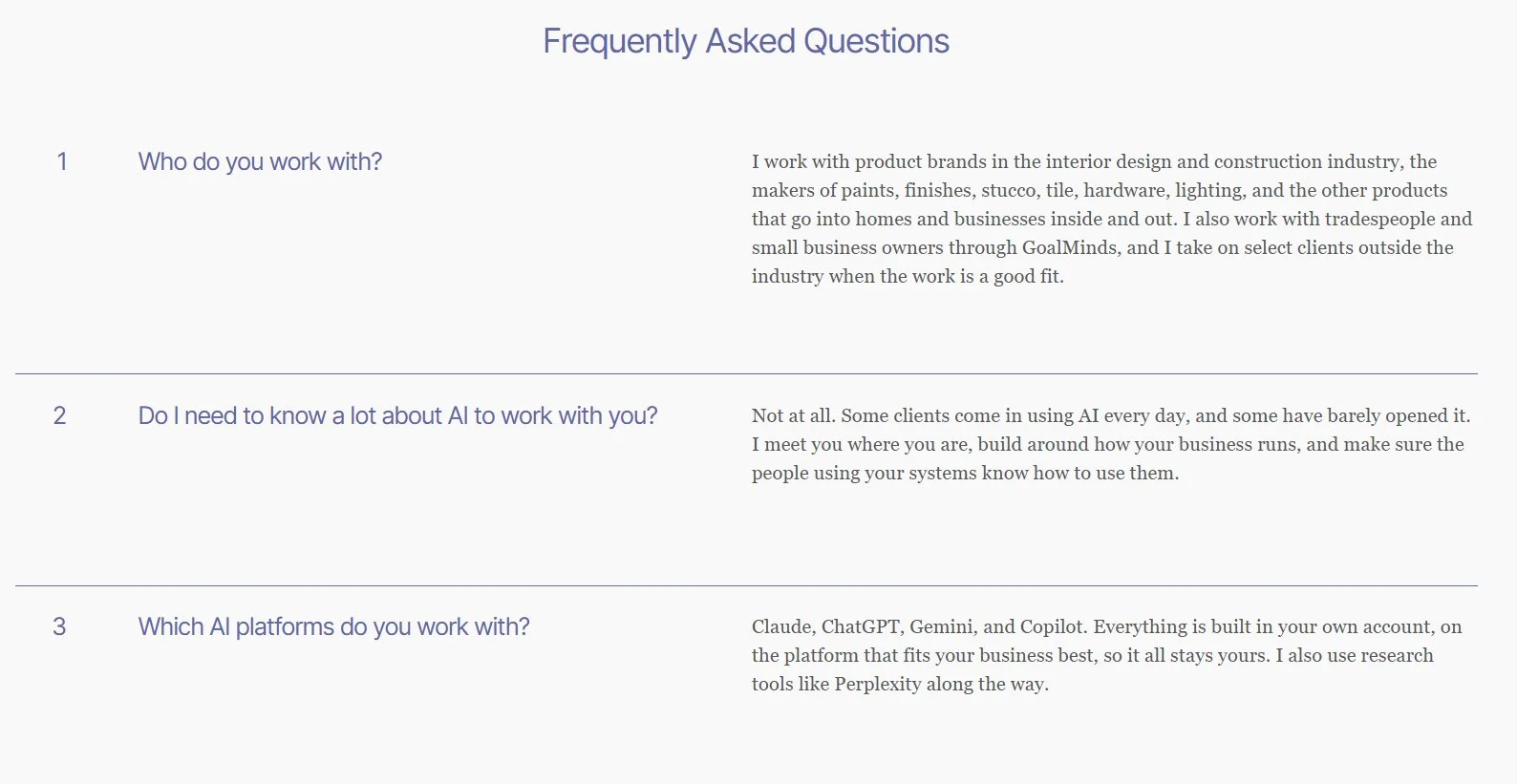
My own FAQ page shows every answer in plain text, and each one starts with the answer.
Put FAQs where questions naturally come up
A FAQ does not belong on every page. A standard list of questions repeated everywhere can become a distraction. Choose the three or four questions most relevant to what that page covers, so visitors find answers where they’re already looking.
Service pages and program pages are good candidates, since visitors often want to know what’s included, how long it takes, and what happens next. A page that simply introduces you or lists your contact details usually doesn’t need one.
You can also give your questions a home of their own with a dedicated FAQ page, and link to it from your menu or footer. General questions about payment, scheduling, and the areas you serve can all live there.
Answer each question in one main place instead of pasting the same list everywhere. The one exception is the detail visitors worry about most, such as timing. That can appear near the top of a page and again in the FAQ near the bottom, for visitors who skim past the top.
Lead with the answer and keep it plain
Put the answer in the first sentence, then add only the detail that helps. A FAQ is not the place for a sales pitch, so leave the persuading to the rest of the page.
On my own FAQ page, someone asks whether they need to know a lot about AI to work with me. The answer begins, “Not at all.” Then it explains what that looks like in practice. A weaker opening would be “Every business is different, and we take a personalized approach.” It sounds pleasant and never answers the question.
If your answer needs a list, such as steps, options, or what’s included, use a simple bulleted list so it’s easy to scan.
Use the questions people ask most often
Write FAQs from the questions customers send you, not the ones you wish they’d ask. Pay attention to the questions that come by phone, email, and at estimates and consults. When you answer the same one for the second or third time, it belongs on the page.
A simple habit helps. Keep a running list of customer questions in the notes app on your phone and add to it as they come in.
It’s easy to drift toward questions that show a business at its best, like “Why are we the best choice?” Most of us have done it. Customers tend to ask plainer things, like “Do you charge for estimates?” or “How long will it take?” Those are the ones worth answering.
Write each question the way a customer would say it, as close to a search phrase as you can while keeping it natural. Once you have a good answer, reuse it in your emails, your social posts, and your Google Business Profile description.
A quick FAQ checklist
Questions and answers are visible on the page, with no plus sign.
Each page carries only the questions that fit it.
Every answer starts with the answer.
The questions come from real customers.
The list is reviewed a few times a year.
Frequently asked questions about FAQs
Do I need a FAQ on every page?
No. Add one where visitors are likely to have questions before they decide, such as service and program pages, and consider a dedicated FAQ page for general questions.
Should I use an accordion with a plus sign?
It’s safer to show the question and answer in plain text. Some search tools and AI systems can’t open content behind a click.
How many questions should a page have?
Three or four of the most relevant questions is plenty for a page. A dedicated FAQ page can hold more.
How often should I update my FAQs?
Review them a few times a year, and add a question whenever you notice you’ve answered it more than once.
Do FAQs still help now that Google stopped showing FAQ drop-downs?
They still help the people reading your page. Google’s change affected how FAQs appear in search results, and Google said site owners don’t need to change their pages.
Where to start
Pick your most visited page and look at it as a brand-new visitor would. Ask what question they might still have, then add that one question and a short answer today.
If you’d like practical marketing, sales, and operations tips in your inbox, join the Thinking Ahead newsletter.